Software for trade fairs, markets and festivals
Exhibitors, booths and invoices in one place
Exhibitors apply online and you decide in one click. Contracts and invoices – e-invoices included – are created from the same data.
- No payment details needed
- Cancel any month
- Servers in Germany
Prefer to talk to someone first? Request a consultation
Features
One system for the whole process
From the first application to admission – without spreadsheets, attachments or retyping.
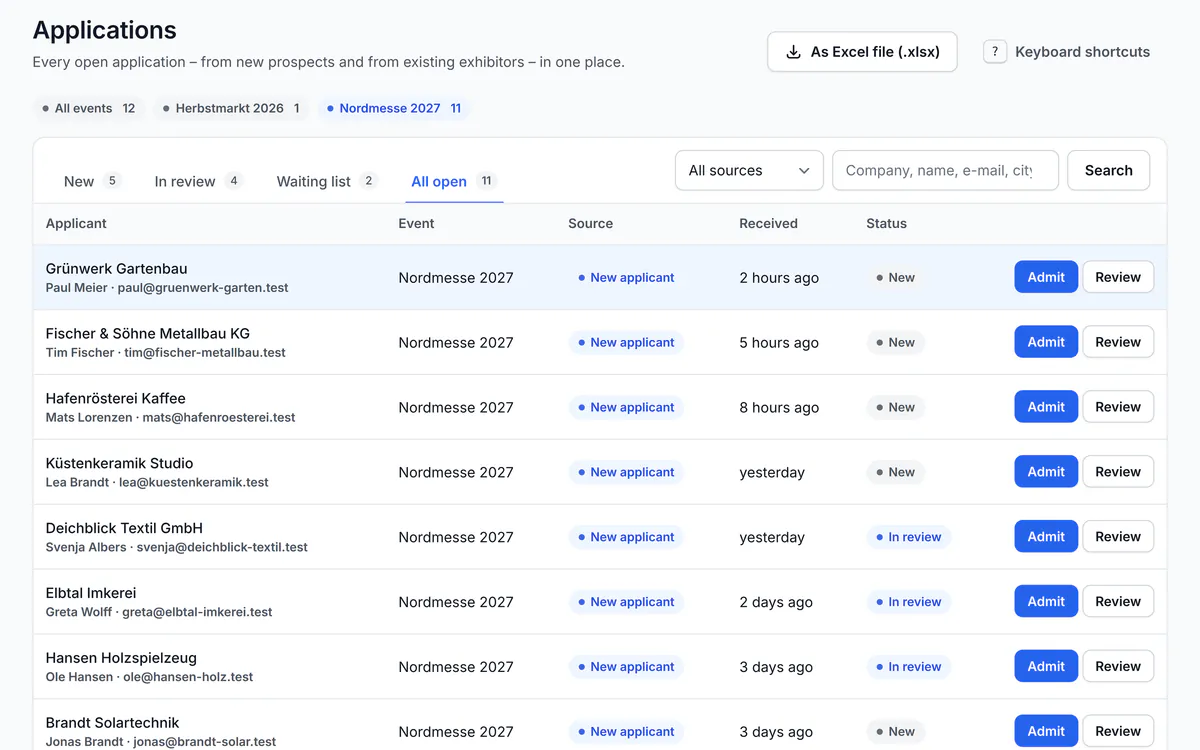
Accept applications online and decide quickly
Your application form lives on your own organiser website. Every application lands neatly in your inbox.
- Guided form with attachments and spam protection without Google
- Accept or decline in one click – the exhibitor is e-mailed automatically
- Contacts with participations, notes, files and history in one place
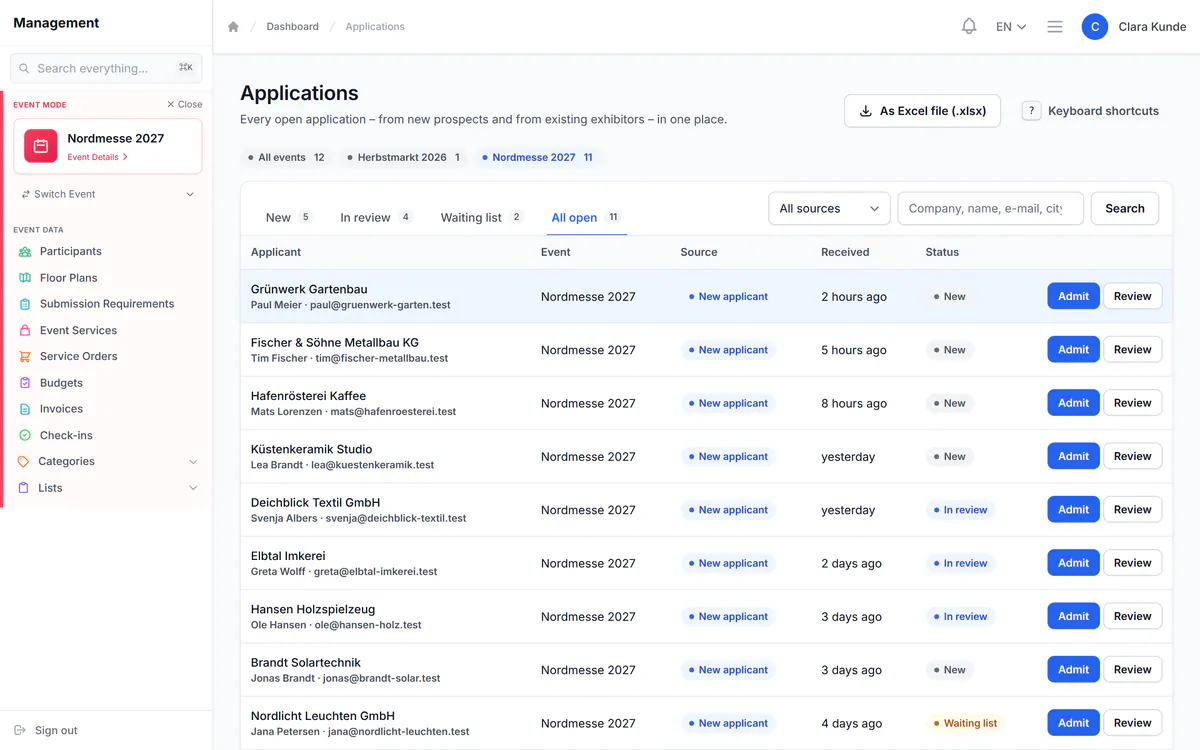
Plan and assign booths on the floor plan
Draw your hall, square or field to scale and assign booths by drag and drop.
- Use your existing hall plan – as a CAD file (DXF), an image or a map
- Colour-coded occupancy: free, reserved, taken, blocked
- Exhibitors reserve their preferred booth in the portal, you confirm
Included from the Professional plan
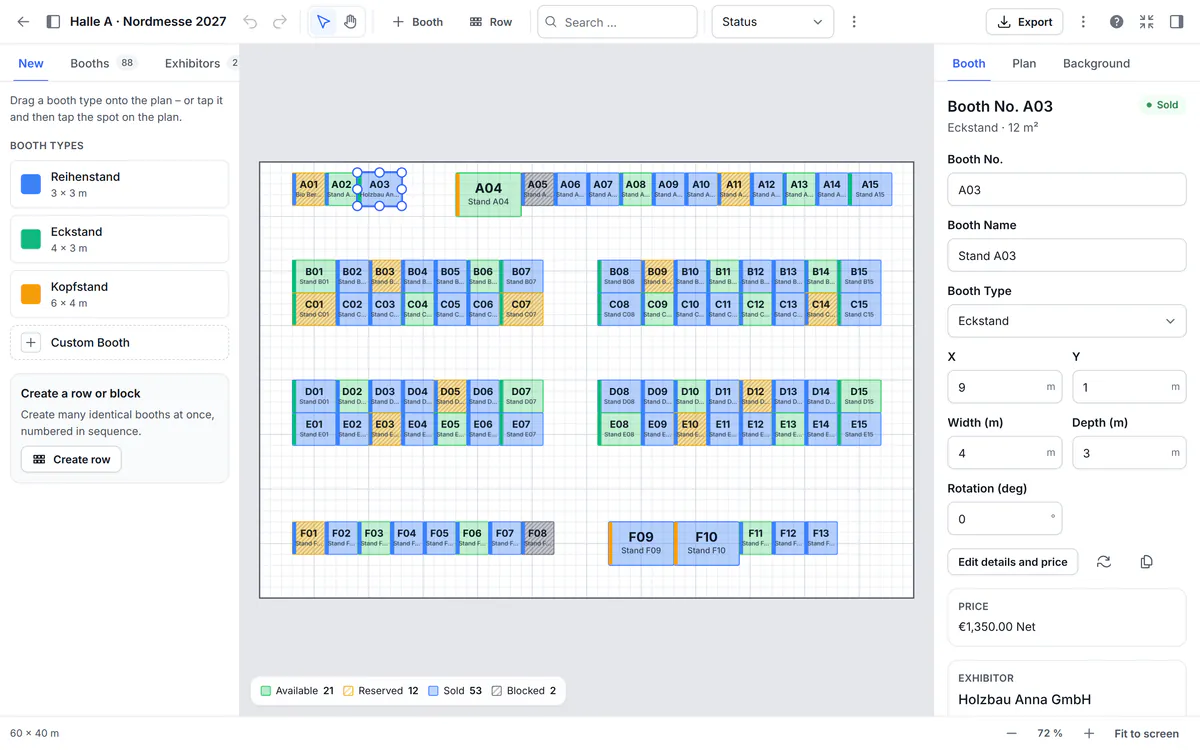
Exhibitors help themselves
Every exhibitor gets their own portal – around the clock, without phone tag.
- Status, booth, documents and invoices at a glance
- Upload logo, catalogue text and certificates – with deadlines and automatic reminders (Professional and up)
- Pay invoices online through your own Stripe or PayPal account (Professional and up)
Contracts that fill themselves in
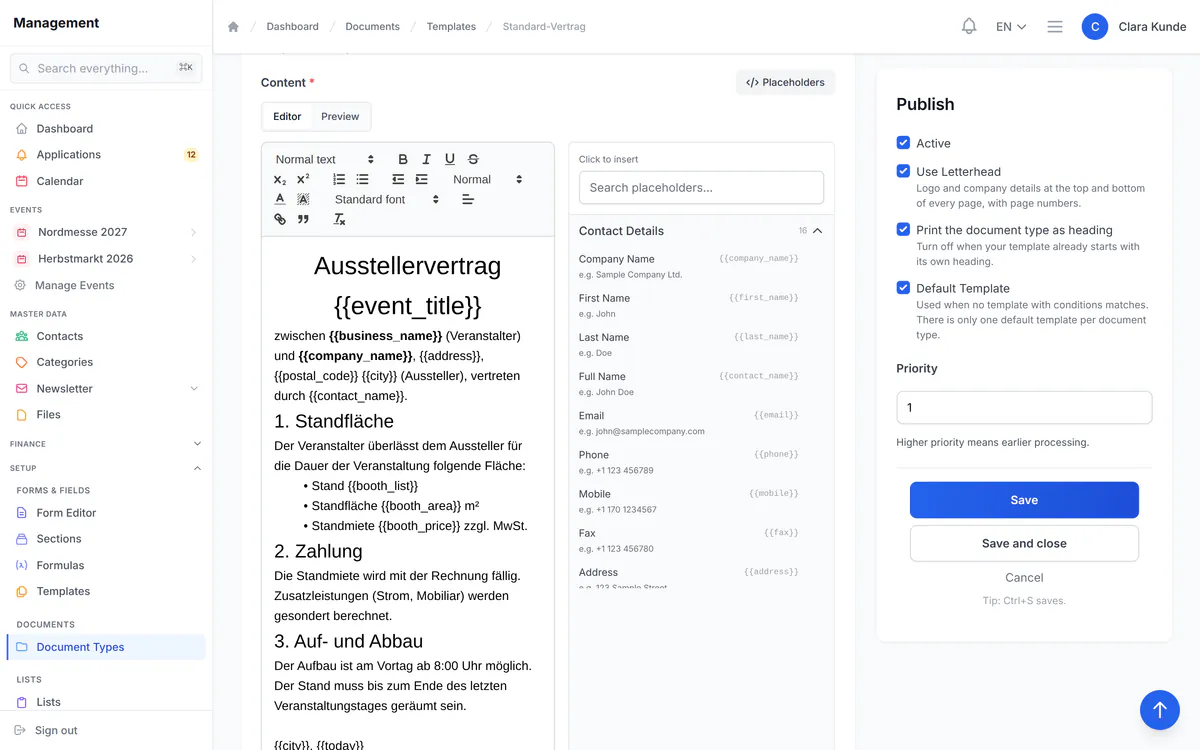
Design a template once – PlanDocket fills in name, address, booth number and prices.
- Templates with letterhead, placeholders and conditions
- PDF at the push of a button – one at a time or for all participants at once
- All contracts and their status on one page
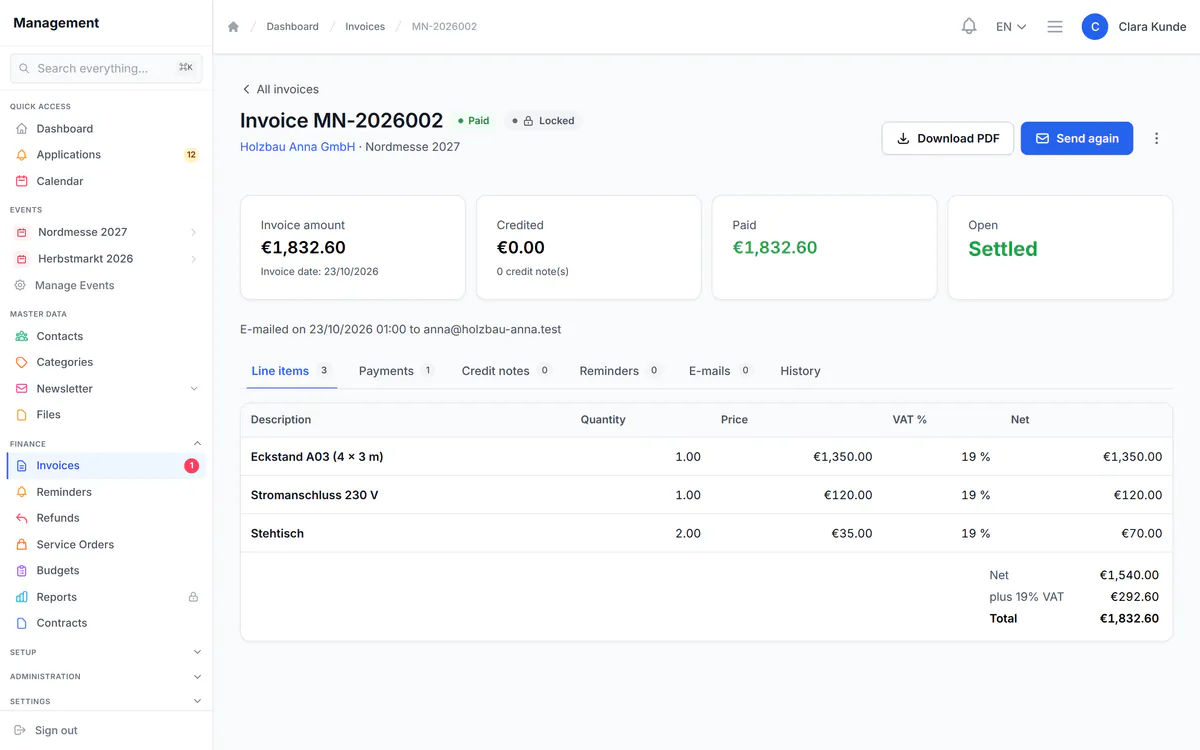
Invoicing done right – including e-invoices
Booth rent, extra services and contract items become an invoice in one click.
- E-invoices in the required format (XRechnung 3.0, ZUGFeRD)
- Issued invoices stay unchanged: locked, numbered without gaps, with a change log (following GoBD principles)
- Record payments and part payments, send reminders in four stages
Ready for the big day
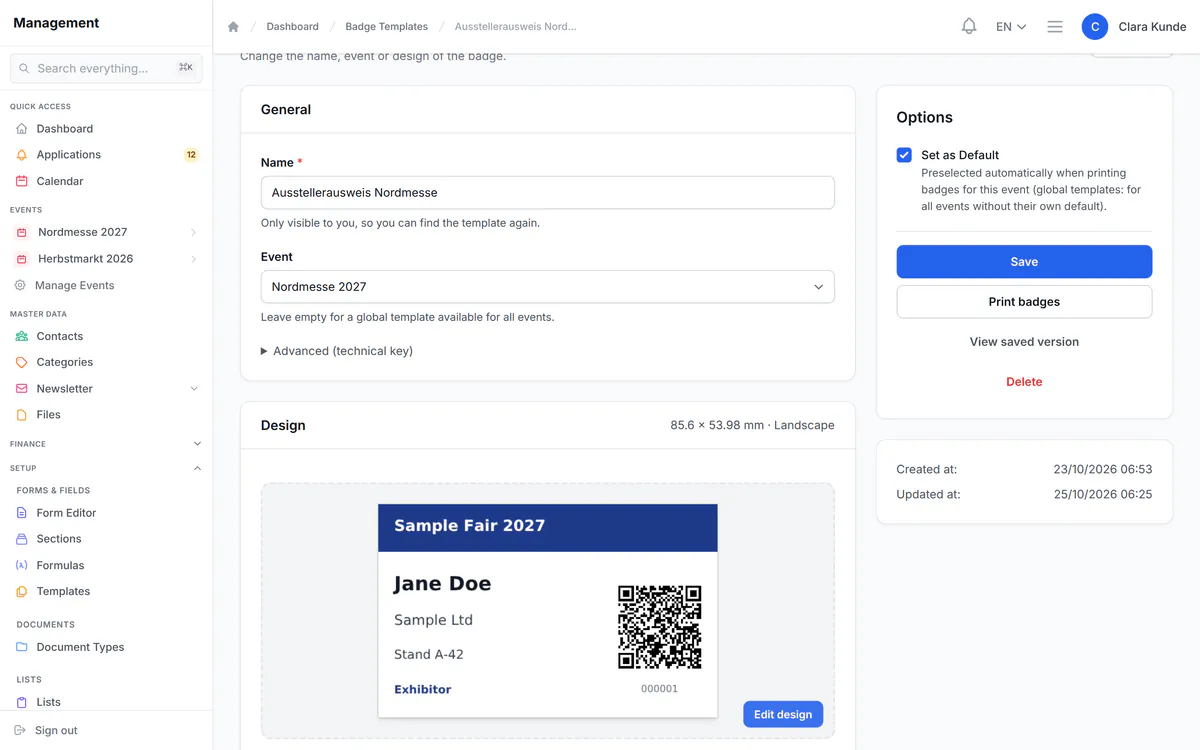
Name badges, admission and programme – all from the same data.
- Design and print badges with QR codes, from card size to A5
- QR code check-in with a phone, right in the browser – no app needed
- Schedule stages and rooms by drag and drop; clashes are detected (Business and up)
E-invoicing
Ready for mandatory e-invoicing in Germany
Since 2025, businesses in Germany must be able to receive e-invoices, and sending them becomes mandatory step by step. PlanDocket already creates your exhibitor invoices as XRechnung or ZUGFeRD – in every plan, with no extra software.
- XRechnung 3.0 and ZUGFeRD/Factur-X to EN 16931
- Routing ID (Leitweg-ID) for public-sector clients
- Send the PDF and the e-invoice file straight by e-mail
- Issued invoices are locked and numbered without gaps
E-invoicing timeline in Germany
- 2025All businesses must be able to receive e-invoices.
- 2027Sending becomes mandatory above €800,000 prior-year turnover.
- 2028Sending becomes mandatory for all domestic business-to-business invoices.
As of October 2026. General information, not tax advice.
How it works
Up and running in three steps
All you need is a browser – there is nothing to install.
-
Step 1 · Today
Create your account
Pick a plan and confirm your e-mail address – your workspace at your-name.
plandocket .com is ready right away. No payment details needed.
-
Step 2 · 14 days
Try it with your event
Set up dates, application form and prices – a setup wizard guides you through the first steps.
-
Step 3 · Before it ends
Continue or let it end
We remind you by e-mail 3 days and 1 day before. To continue, you subscribe in your customer account.
Pricing
Clear prices. No long-term contract.
Try any plan free for 14 days – no payment details.
-
Starter
For smaller events without a floor plan
€49 / month plus VAT
Applications, exhibitor portal, documents, invoices with e-invoicing, plus badges and check-in.
- Events
- 3
- Contacts
- 500
- Admin logins
- 2
All limits and features
- Participants per event
- 250
- Storage
- 500 MB
- E-mails per month
- 200
- Online applications and contacts
- Exhibitor portal
- Form and list builder
- Documents and contracts
- Invoices and e-invoicing
- Badges and check-in
-
Professional
RecommendedFor trade fairs and markets with a floor plan
€149 / month plus VAT
Adds floor plans, booth assignment, extra services, document collection, price rules and online payment.
- Events
- 15
- Contacts
- 2,500
- Admin logins
- 5
All limits and features
- Participants per event
- 1,000
- Storage
- 5 GB
- E-mails per month
- 1,000
Everything in Starter, plus:
- Floor plan editor
- Booth assignment and self-service booking
- Extra services in the portal
- Document collection
- Price rules
- Online payment (Stripe, PayPal)
+ 2 more in the plan comparison
-
Business
For events with a stage programme
€299 / month plus VAT
Adds schedule and programme, website builder, tasks, reports, DATEV export, e-signature connection and REST API.
- Events
- 50
- Contacts
- 10,000
- Admin logins
- 15
All limits and features
- Participants per event
- 5,000
- Storage
- 20 GB
- E-mails per month
- 5,000
Everything in Professional, plus:
- Schedule and programme
- Website builder
- Tasks
- Reports
- DATEV-Export
- DocuSign / Dropbox Sign connection
+ 1 more in the plan comparison
Enterprise
€499 / month plus VAT
Adds unlimited events and contacts, a custom domain and company login (single sign-on).
All prices plus statutory VAT. Billed monthly, cancel at the end of any billing period. The trial includes every feature of the plan you choose.
Questions about Enterprise, payment or larger events? We are happy to advise you. Request a consultation
| Feature | Starter | Professional | Business | Enterprise |
|---|---|---|---|---|
| Limits | ||||
| Events | 3 | 15 | 50 | Unlimited |
| Contacts | 500 | 2,500 | 10,000 | Unlimited |
| Participants per event | 250 | 1,000 | 5,000 | Unlimited |
| Admin logins | 2 | 5 | 15 | 50 |
| Storage | 500 MB | 5 GB | 20 GB | 100 GB |
| E-mails per month | 200 | 1,000 | 5,000 | 20,000 |
| Invoices per month | 50 | 200 | 1,000 | Unlimited |
| Custom fields | 10 | 25 | 50 | Unlimited |
| Document templates | 5 | 15 | 30 | Unlimited |
| Floor plans | not included | 5 | 15 | Unlimited |
| Applications & data | ||||
| Form builder with custom fields | included | included | included | included |
| List builder | included | included | included | included |
| Price rules | not included | included | included | included |
| Team tasks | not included | not included | included | included |
| Reports | not included | not included | included | included |
| Floor plan & booths | ||||
| Floor plan editor | not included | included | included | included |
| Booth assignment and self-service booking | not included | included | included | included |
| Exhibitor portal | ||||
| Extra services in the portal | not included | included | included | included |
| Document collection | not included | included | included | included |
| Online payment (Stripe, PayPal) | not included | included | included | included |
| Documents & finance | ||||
| Documents and contracts | included | included | included | included |
| Invoices and e-invoicing | included | included | included | included |
| DocuSign / Dropbox Sign connection | not included | not included | included | included |
| DATEV export | not included | not included | included | included |
| Programme & website | ||||
| Schedule and programme | not included | not included | included | included |
| Website builder | not included | not included | included | included |
| Custom domain | not included | not included | not included | included |
| Technology & security | ||||
| Webhooks | not included | included | included | included |
| REST API | not included | not included | included | included |
| Web analytics with consent | not included | included | included | included |
| Company login (single sign-on) | not included | not included | not included | included |
| In every plan | ||||
| E-invoicing (XRechnung, ZUGFeRD), exhibitor portal, badges and check-in, newsletter and bulk e-mail, your logo and colours, German and English, two-factor sign-in, import (CSV) and export (CSV, Excel) | ||||
| Starter: Start free trial | Professional: Start free trial | Business: Start free trial | Enterprise: Start free trial | |
Security
Security and privacy
What we do for your data and your exhibitors' data.
-
Servers in Germany
PlanDocket runs on servers operated by Hetzner Online GmbH in Germany.
-
Encrypted connections
All connections use HTTPS; credentials for connected services are stored encrypted.
-
Two-factor sign-in
For your team and your exhibitors – and it can be made mandatory for admins.
-
Roles and permissions
You decide who in your team can see and change what.
-
Data export and deletion
Exhibitors download their data or delete their account themselves.
-
Spam protection without Google
Your forms are protected without Google captcha and without tracking.
Integrations
Works with the tools you already use
You connect each service with your own account at the provider.
-
DATEV export
Bookings and customers as a DATEV file for your tax adviser.
Available from Business -
Stripe and PayPal
Exhibitors pay invoices online; payments are recorded automatically.
Available from Professional -
DocuSign and Dropbox Sign
Send contracts for signature through your own DocuSign or Dropbox Sign account.
Available from Business -
Mailchimp and Brevo
Pass newsletter sign-ups to your Mailchimp or Brevo list.
-
Webhooks for your IT
More than 40 events such as application, payment or check-in, signed and sent to your systems.
Available from Professional -
REST API
Read and create data via the API, with keys and permissions.
Available from Business -
Company login
Your team signs in with the company login; users are created automatically (SAML 2.0, SCIM 2.0).
Available Enterprise only -
Web analytics
Google Analytics, Tag Manager, Matomo and more – loaded only after consent.
Available from Professional
The plan comparison shows which connection is included in which plan.
View the API documentation
Every feature at a glance (66)
Events, applications & contacts
12 features · From first enquiry to confirmed exhibitor: everyone in one place.
-
Online applications
Guided form on your website, with attachments and spam protection without Google.
-
Decide on applications
Accept or decline in one click; the exhibitor is notified automatically.
-
Secure portal invitation
Exhibitors get an invitation link instead of a password by e-mail.
-
Contact and exhibitor database
Companies and contacts with participations, notes, files and history.
-
Participant lists
See per event who has confirmed and who has paid; filter and export.
-
Copy last year's event
Dates shift automatically and your settings come along.
-
Dashboard, calendar and search
New applications, due invoices and deadlines at a glance; find anything fast.
-
Notes, history and recycle bin
Restore deleted events, contacts and applications; changes stay traceable.
-
Import and export
Bring contacts in by CSV, download lists as CSV or Excel.
-
Setup wizard
Guides you step by step to your first event.
-
Team tasksAvailable from Business
Assign tasks and keep an eye on due dates.
-
ReportsAvailable from Business
Revenue, booths, exhibitors and services per event as charts.
Floor plans & booth sales
6 features · Draw your venue, assign booths, see occupancy at a glance.
-
Floor plan editorAvailable from Professional
Draw a hall, square or field to scale and place booths by drag and drop.
-
Floor plan or map as backdropAvailable from Professional
CAD plan (DXF), image or map section as the background.
-
Booth types and pricesAvailable from Professional
Fixed price, per m², per metre of frontage or depth – per category and event.
-
Assign boothsAvailable from Professional
Drag exhibitors onto a booth; confirmation by e-mail, booth rent goes straight to billing.
-
Exhibitors choose their boothAvailable from Professional
Exhibitors reserve their preferred booth in the portal, you confirm.
-
Print and export plansAvailable from Professional
PDF from A4 to A0 with scale, PNG, DXF and a booth list.
Exhibitor portal & website
11 features · Status, documents and invoices for every exhibitor – around the clock.
-
Dedicated exhibitor portal
Status, tasks, documents, invoices and dates for every exhibitor.
-
Re-apply in a few clicks
Returning exhibitors apply for further events in the portal.
-
Order extra servicesAvailable from Professional
Power, furniture and more – with early-bird prices, order deadlines and quantity limits.
-
Collect documentsAvailable from Professional
Let exhibitors upload, review, request corrections; automatic reminders.
-
Lists filled in by exhibitors
Exhibitors enter booth staff, vehicles and more themselves until the deadline.
-
Pay invoices onlineAvailable from Professional
By card or PayPal through your own Stripe or PayPal account; the payment is recorded automatically.
-
Own dates in the calendarAvailable from Business
Add set-up and performance times to their own calendar in one click.
-
Self-service
Profile, language, two-factor sign-in, data export and account deletion.
-
Organiser website
your-name.
plandocket .com with application form, contact, imprint, privacy policy and terms – in your logo and colours. -
Website builderAvailable from Business
Your own pages from blocks, menus, media library, drafts with versions.
-
Custom domainAvailable Enterprise only
Portal and website at your own address, with an SSL certificate.
Forms, lists & price rules
5 features · Ask exactly what your event needs, no programming required.
-
Form builder
18 field types via drag and drop, preview for phone, tablet and desktop.
-
Conditional questions
Questions appear only when they apply – for example per category.
-
Add fields where you work
Create a missing field right where you are working.
-
List builder
Your own lists with your own fields, deadlines and minimum or maximum entries.
-
Price rules that do the mathsAvailable from Professional
Define area × price plus surcharges once – booth prices and invoice items calculate themselves.
Documents & contracts
4 features · Design once, use for every exhibitor.
-
Templates with placeholders
Design contracts and confirmations once, with letterhead and conditions.
-
Documents at the push of a button
PDF with letterhead and page numbers, one at a time or for everyone at once.
-
Contract overview
All contracts and their status on one page.
-
DocuSign and Dropbox Sign connectionAvailable from Business
Send contracts for signature through your own DocuSign or Dropbox Sign account.
Invoicing, payments & e-invoicing
9 features · Clean billing, from booth rent to payment reminders.
-
Invoices from bookings
Booth rent, extra services and contract items become an invoice in one click – also for everyone at once.
-
E-invoicing
In the required format XRechnung 3.0 or ZUGFeRD, with routing ID (Leitweg-ID) for public-sector clients.
-
Invoices that stay unchanged
Following GoBD principles: issued invoices locked, change log, gap-free numbering.
-
Credit notes, cancellations, corrections
Partial credit notes, cancellation with reversal and corrected reissue.
-
EU reverse charge
Reverse charge for exhibitors from other EU countries: 0 % VAT and the required note on the invoice; PlanDocket checks for an address in another EU country and a VAT ID on file.
-
Invoices by e-mail
PDF and e-invoice file attached; separate billing address per exhibitor.
-
Payments and reminders
Record bank transfers, cash and part payments; send reminders in four stages, optionally as a daily run.
-
DATEV exportAvailable from Business
Bookings and customers as a DATEV file for your tax adviser (posting batch and debtors).
-
Budgets and expenses
Budget per event, expenses with receipts, overruns visible at once.
Communication
5 features · The right message at the right time, in German and English.
-
E-mail templates
Customise every automatic e-mail with your logo; each recipient gets their language.
-
Bulk e-mail
To everyone or a filtered selection, with a test send.
-
Newsletter with statistics
Blocks, scheduled sending, open and click rates, double opt-in.
-
Mailchimp and Brevo
Pass newsletter sign-ups to your Mailchimp or Brevo list.
-
Web analytics with consentAvailable from Professional
Google Analytics, Tag Manager, Matomo and more – loaded only after consent.
On site: badges, check-in & programme
6 features · Ready for the big day.
-
Badge designer
Design name badges with QR codes, from card size to A5.
-
Print badges
One per page or on A4 with crop marks; you can see what has been printed.
-
QR code check-in
Scan with a phone, check in and out, count who is there – right in the browser.
-
Schedule timelineAvailable from Business
Programme and set-up times by drag and drop on stages and rooms; clashes are detected.
-
Run sheet and notificationsAvailable from Business
Print version, calendar file and CSV; people involved are told about changes.
-
Public programmeAvailable from Business
Visitors browse the programme by day and stage and add sessions to their calendar.
Integrations, security & privacy
8 features · Open to your tools, strict with your data.
-
REST APIAvailable from Business
Events, contacts, invoices, booths and more via API, with keys and permissions.
-
WebhooksAvailable from Professional
More than 40 events such as application, payment or check-in, signed and sent to your systems.
-
Company login (single sign-on)Available Enterprise only
Your team signs in with the company login; users are created automatically (SAML 2.0, SCIM 2.0).
-
Two-factor sign-in
For your team and exhibitors; can be made mandatory for admins.
-
Roles and permissions
Ready-made roles and a matrix with more than 70 permissions.
-
Privacy tools
Cookie consent with records, double opt-in, data export and self-service deletion.
-
Bilingual: German and English
Admin, exhibitor portal and e-mails; everyone picks their language.
-
Help centre and API docs
Guides for organisers and exhibitors, API reference with an OpenAPI file.
FAQ
Frequently asked questions
Can I try PlanDocket for free?
What happens after the trial?
Are there hidden costs?
How do I pay for PlanDocket?
How long am I committed?
How much effort is it to get started?
Can I bring my Excel list?
What do my exhibitors need?
Where is my data stored?
Can I create e-invoices?
Can't find your question? Get in touch. info@plandocket.com
Request a consultationTry PlanDocket with your next event
Free for 14 days – no payment details. Nothing to install, cancel any month.